


So here's something that actually matters: OpenAI just made their reasoning model available to everyone – including free ChatGPT users. It's called o3-mini, and it's genuinely different from regular ChatGPT.
The short version: use it for anything that needs math or logic. Stick with regular ChatGPT for everything else.
What's a "Reasoning Model"?
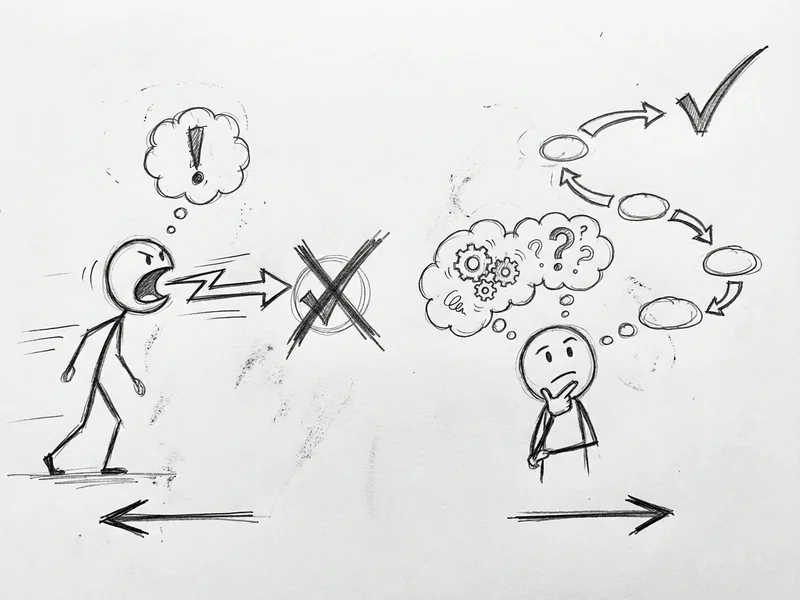
Regular ChatGPT gives you an answer immediately. It's fast, but it sometimes rushes and gets things wrong – especially with math or multi-step problems.
Reasoning models work differently. They use a "chain of thought" technique – basically thinking through the problem step by step before giving you an answer. The model can catch its own mistakes during this thinking process and correct them.
Think of it like the difference between someone blurting out the first answer that comes to mind versus someone who actually works through the problem on paper first.
What Actually Launched
On January 31, 2025, OpenAI released o3-mini to everyone. This is the first time a reasoning model has been available to free ChatGPT users.
Previously, you needed a paid subscription to access models that could actually think before answering. Now you don't.
To try it, just look for the "Reason" button in ChatGPT, or regenerate a response and select o3-mini.
The Three "Thinking Modes"
Here's where it gets interesting. o3-mini has three reasoning effort levels: low, medium, and high. Think of it as how hard you want the model to think.
- Low effort – Fast answers, around 10 seconds. Good for quick questions where you don't need perfection.
- Medium effort – About 30 seconds. Matches the performance of o1 (OpenAI's previous top reasoning model) on hard benchmarks. This is the default in ChatGPT.
- High effort – Takes a bit longer but thinks deeper. Best for genuinely hard problems.
In my testing, medium mode is the sweet spot for most business tasks. High mode is overkill unless you're doing something genuinely complex.
What It's Actually Good At
o3-mini is optimized for STEM – science, technology, engineering, and math. That's not marketing speak. It genuinely crushes these types of problems.
Some practical examples:
- Calculating loan payments – Ask it to show the math, and it actually gets it right
- Debugging code – It can trace through logic errors step by step
- Tax calculations – "What's my quarterly estimated tax if I made X this month?"
- Inventory math – "I sold Y units at Z margin, what's my actual profit after shipping?"
- Logic puzzles – Things that require working through multiple conditions
One tester threw a Sudoku puzzle at every major AI model. o3-mini was the first to solve it correctly. That's not a business use case, but it tells you something about how it handles structured reasoning.
The Numbers (If You Care)
o3-mini is 24% faster than the previous mini reasoning model, with an average response time of 7.7 seconds versus 10.16 seconds.
More importantly: expert testers found a 39% reduction in major errors compared to the previous version. That's the kind of improvement that actually matters for business use.
What It's NOT Good At
Here's the honest part – o3-mini isn't better at everything.
No image understanding. Can't analyze photos, screenshots, or documents. If you need to ask about an image, stick with regular ChatGPT.
Not great for long writing. One translator tested it and found the quality dropped in the second half of long documents. It started using weird shortcuts like slashes instead of "and."
Slower by design. The thinking takes time. If you just need a quick answer to a simple question, regular ChatGPT is faster.
Can be inconsistent. Like all AI, it doesn't always give the same answer twice. Still requires your judgment.
The Simple Rule
Here's how I think about it:
Use o3-mini when:
- The question involves numbers or calculations
- You need step-by-step logic
- There's a "right answer" you're trying to get to
- Debugging code or working through technical problems
Use regular ChatGPT (GPT-4o) when:
- You're drafting emails, proposals, or marketing copy
- You need to analyze an image or screenshot
- Speed matters more than perfect accuracy
- Creative writing or brainstorming
- You need web search integrated into the response
They're different tools for different jobs. Like having both a calculator and a notepad on your desk.
What About Paid Users?
If you're paying for ChatGPT Plus, you get more access. OpenAI tripled the rate limits – from 50 messages per day to 150 messages per day with o3-mini.
Paid users also get access to "o3-mini-high" mode for tasks that need extra thinking power.
Is it worth upgrading just for o3-mini? Probably not. But if you're already on the fence about Plus, this is another good reason.
The Bottom Line
OpenAI just gave everyone access to a model that actually thinks before it speaks. For anything involving math, logic, or step-by-step reasoning, o3-mini is noticeably better than regular ChatGPT.
My recommendation:
- Try it on a real problem – Something where you know the right answer. See if it gets it right.
- Start with medium reasoning – It's the default for a reason. Good balance of speed and accuracy.
- Use high mode sparingly – Only when you really need it to think hard
- Don't abandon regular ChatGPT – It's still better for writing, images, and quick questions
The free version is genuinely useful. Go test it on something that matters to your business.
When to Get Help
AI tools are getting powerful, but they're not magic. You still need to know which tool to use for which problem, and how to actually integrate it into your workflow.
We use these tools every day – Claude, ChatGPT, and now o3-mini – to help clients analyze competitors, build custom tools, and solve actual business problems. It's not about using every new thing that drops. It's about using the right tools for the right problems.
Not sure where to start? Let's talk. I'll walk you through what makes sense for your business – no charge for the conversation.