


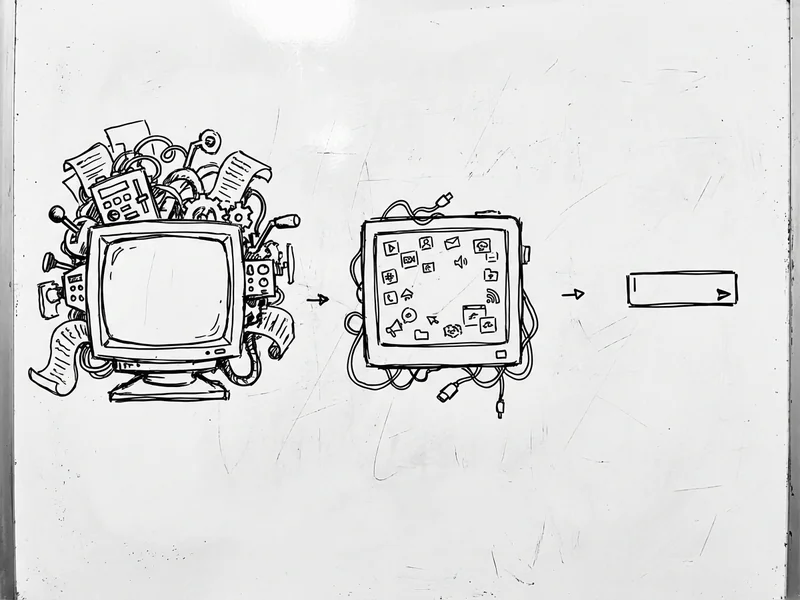
There's a Ted Nelson quote from 2008 that I keep coming back to. He said that almost everything you see on your computer screen is a construct—something people imagined and then built. Word processors, email, playlists, chat rooms. These aren't technology. They're ideas that someone made up, with technology underneath to make them work.
I've been thinking about that a lot lately. Because the constructs are changing. Fast.
If you've used any software in the last year, you've probably noticed: everything is turning into a chat box. Your email has an AI summary. Your design tools have a prompt sidebar. Your code editor is basically a conversation now. And the question I keep asking myself is: is that good?
Why Buttons Existed in the First Place
Back when graphical interfaces were invented, they solved a real problem. Before GUIs, you had to memorize commands. You had to know the exact right thing to type or nothing happened. It was like trying to order food in a language you don't speak.
Buttons, menus, and icons changed that. The whole idea was based on a principle called "recognition over recall"—it's easier to recognize what you want from a list than to remember it from scratch. A menu shows you what's possible. You don't have to guess.
And that worked. For decades. Until it didn't.
Here's what happened: software got complicated. Really complicated. 80% of features in the average software product are rarely or never used. Think about that. Four out of five buttons you see in most apps? Nobody clicks them. Settings sprawled. Menus nested inside menus. Dashboards became walls of charts nobody reads.
Recognition only works when there's a reasonable amount of stuff to recognize. When your accounting software has 400 options, recognition becomes visual overload.
Enter the Chat Box
So here's where language comes in. When navigating menus is harder than just describing what you want, people default to text. That's why AI chat interfaces feel fast—even to people who aren't technical.
Instead of clicking through Settings > Data > Export > Format > CSV > Date Range > Custom... you type "export last month's data as a CSV." Done.
This isn't a return to the old command line. The old command line required exact syntax—one typo and nothing worked. This is different. You describe what you want in plain language, and the system figures out the steps. The interface takes a step back. What remains is a conversation.
And it's happening everywhere. 84% of developers are already using or planning to use AI tools. GitHub Copilot hit 20 million users and now generates 46% of code developers write. Cursor—an AI code editor that's basically a chat box that writes software—went from zero to $500 million in annual revenue faster than any SaaS company in history.
Dries Buytaert, who created Drupal, put it bluntly: "AI handles 80% of the work. Humans handle the remaining 20% by setting direction at the start, and refining, approving, and taking responsibility at the end."
The Part Nobody Talks About: Two Paths, Both Messy
Here's where it gets interesting. And a little nerdy—bear with me, because this matters.
As more things collapse into that chat box, two paths are emerging. Both are compromises.
Path 1: You learn to speak like a machine.
For casual stuff—"summarize this email" or "what's on my calendar"—plain language works fine. But as tasks get more complex, casual language stops being enough. Precision matters.
If you want an AI to generate a specific image, "make a beautiful sunset" gives you... something. A structured prompt with resolution, style, composition, color palette? That gives you what you actually wanted. When you need AI to build something specific—a report, a workflow, an application—you end up writing what are essentially specifications. It looks like a conversation, but the thinking behind it is more like programming.
Research backs this up. A 2025 study found that unguided AI use—just chatting casually with a bot—"fosters cognitive offloading without improving reasoning quality." But when people used structured prompts, they actually thought more carefully and produced better results.
Translation: the more specific you are with AI, the better your thinking gets. The more vague you are, the more you outsource your thinking entirely.
Path 2: Hybrid interfaces that can't decide what they are.
Not everyone wants to write structured prompts. So we're seeing tools that bolt visual controls onto chat. Claude has its Artifacts panel. ChatGPT has Canvas. Cursor has a sidebar with file trees and previews. Google's AI Studio has a Build tab.
These aren't pure language interfaces. They're attempts to give you visual handles on what's happening—ways to inspect and modify outputs without writing more instructions. But they feel patchy. Part chat, part traditional interface. You talk to generate something, then manipulate it visually, then chat again to change it.
Both paths share one thing: the chat input is now the assumed starting point. The default mode of control. Whether you're writing structured prompts or navigating a hybrid interface, you're still ultimately working through a text field.
What This Does to How You Think
Here's the part that keeps me up at night.
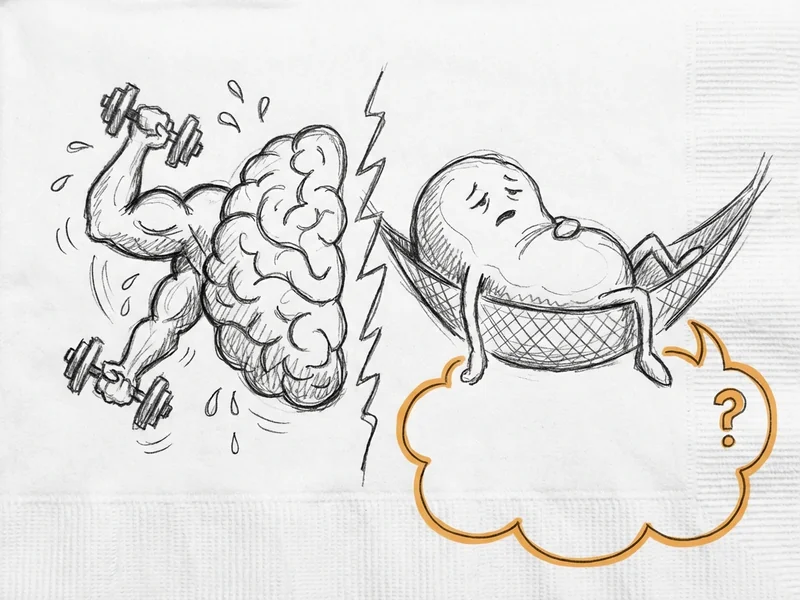
The tools you use shape how you think. This isn't philosophical hand-waving—it's documented. When we use calculators for math or search engines for facts, we stop remembering the information itself and start remembering where to find it. Psychologists call this cognitive offloading.
A 2025 study found a significant negative correlation between heavy AI tool usage and critical thinking abilities—with cognitive offloading as the connecting factor. The more you let AI do the thinking, the less practice your brain gets at thinking independently.
Now, correlation isn't causation. And AI doesn't make you stupid. But tool use shapes the architecture of attention. When every interaction requires you to be specific and structured, that reinforces planning and clear thinking. When every interaction lets you be vague and still get a result, that reinforces... not thinking very hard.
There's a concept in psychology called the Einstellung effect—once you learn a particular way to solve problems, that solution blocks alternatives. It's a cognitive bias. When the prompt becomes your default tool, every problem starts to look like something that needs instructions. Language becomes the hammer, and everything becomes a nail.
Why This Matters for Your Business
I know what you're thinking: "Onur, I run a business. I don't care about cognitive science. I just need my software to work."
Fair. But here's why this affects you directly:
- Your tools are changing whether you like it or not. The software you use every day—your email, your accounting app, your CRM—is getting chat interfaces bolted on. Understanding how to use them well (structured, specific) vs. poorly (vague, lazy) is the difference between saving time and creating messes.
- "Just ask AI" isn't always the answer. Sometimes clicking through a dashboard is faster and more reliable than describing what you want. The visual overview exists for a reason. Don't throw it out just because chat is trendy.
- Your employees are adapting right now. If your team uses AI tools daily, they're already developing habits. Are they developing good ones (clear thinking, verification, structured requests) or bad ones (vague prompts, blind acceptance of outputs)?
- The next generation has only known this. People entering the workforce today might never have used software without a chat interface. That's not bad. But it's different. And the habits they form now will shape how they think about problems for decades.
What Getting This Right Looks Like
I don't think the answer is "resist AI" or "go back to complicated menus." The interface is flattening, and that's mostly a good thing. But a few principles are worth holding onto:
- Be specific, not vague. When you use AI tools, treat them like a contractor: the clearer your instructions, the better the result. "Make this better" gets you garbage. "Rewrite this paragraph to be shorter and focus on the cost savings" gets you something useful.
- Verify, don't assume. Chat interfaces hide what's happening behind the scenes. When AI does something for you, check the work. Read the output. Don't just trust it because it sounds confident.
- Keep visual tools in the mix. Spreadsheets, dashboards, project boards—these exist because seeing data helps you think about data. Don't abandon them for a chat box.
- Explore before you specify. The best problem-solving starts with poking around, not writing a spec. Try things. Look at things from different angles. Then write the prompt.
The shift from visible interfaces to language-based control is already underway. It's not something to fear. But it's worth paying attention to—not just what these tools do for us, but what they do to us.
The Bigger Picture
Design was never really about boxes and buttons. It was always about designing how minds work. How people find information, make decisions, and get things done.
That hasn't changed. The chat box is just a new shape for the same challenge. And the businesses (and people) who get this right will be the ones who use language interfaces to think more clearly—not less.
If you're wondering how to navigate these changes for your specific business, or you just want to talk through how AI tools are reshaping your workflow, I'm always happy to chat. No jargon, no pressure. Just practical advice from someone who thinks about this stuff way too much.