
The Problem
Every day, people fill out your contact form ready to hire you. But you're on a job site. In a meeting. Not glued to your inbox.
Those leads sit there getting cold. By the time you respond, they've already called someone else.
A plumber in Paso Robles told me he was losing 2-3 leads a week this way. Not because he didn't want the work. Just because he didn't see the email in time.
Now every form submission hits his phone via Slack. While the lead is still hot.
What This Does
- Receives form submissions in real-time from Typeform, Google Forms, or any webhook-compatible form
- Creates or updates contacts in HubSpot with all their info organized
- Sends instant Slack notification with name, email, phone, and message
- Works 24/7, even when you're offline, sleeping, or on the job
No more missed leads. No more "sorry, I just saw this."
How It Works
The flow is simple:
- Customer fills out your contact form on your website
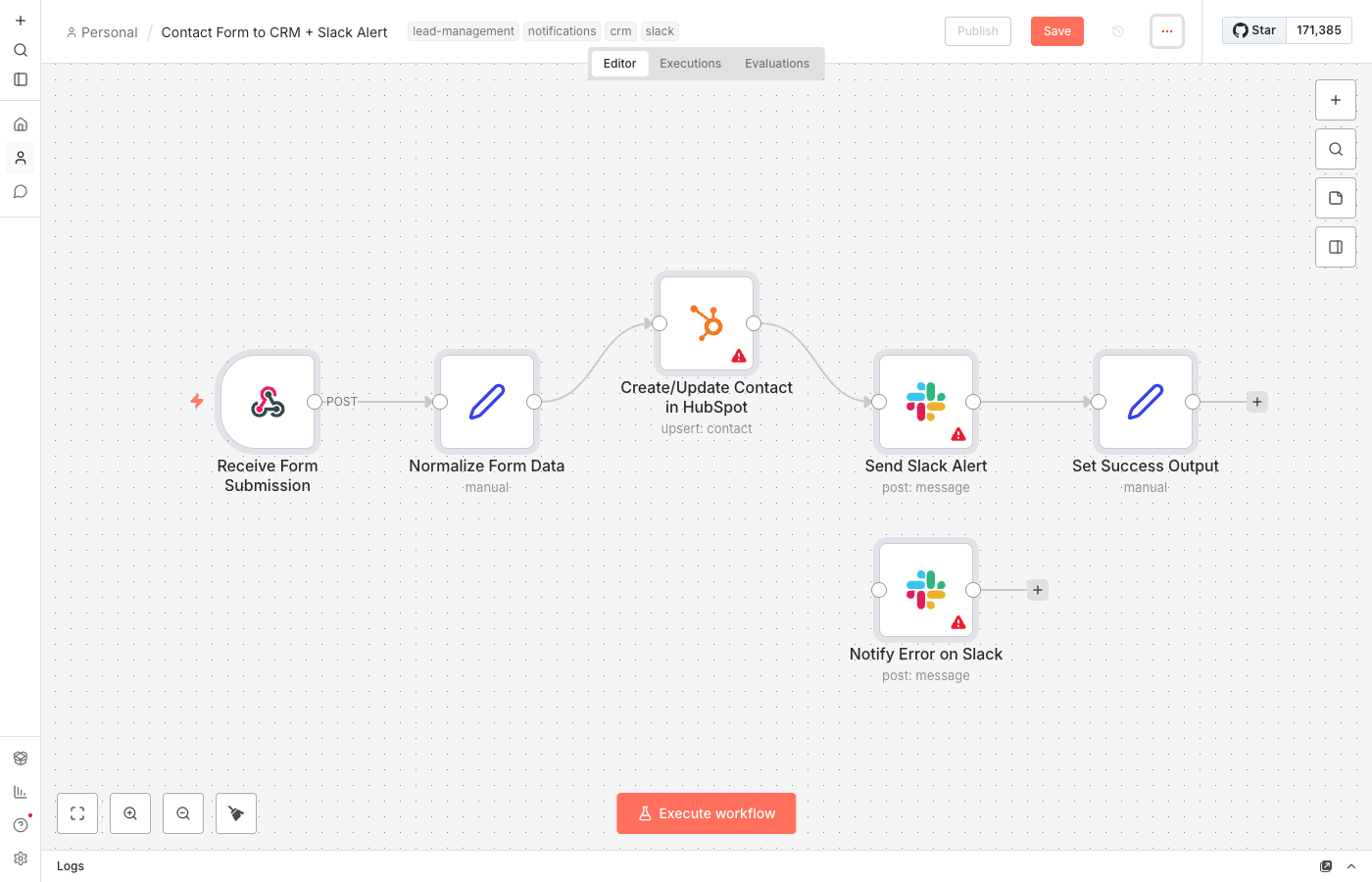
- Form triggers n8n workflow via webhook (automatic, instant)
- Workflow normalizes the data to handle different form field names
- Contact created in HubSpot with name, email, phone, and message
- Slack message lands in your channel with all the details you need to respond
From form submission to your phone: under 5 seconds.
What You'll Need
To get this running:
- n8n instance - Self-hosted (free) or n8n Cloud ($20/month)
- Contact form with webhook capability - Typeform, Google Forms + script, or any custom form
- HubSpot account - Free tier works great for this
- Slack workspace - Free or paid, doesn't matter
Total setup time: 10-15 minutes. Most of that is copying and pasting connection URLs.
Setup Instructions
- Import the workflow - Download the JSON file and import it into your n8n instance
- Configure the webhook - Copy the webhook URL from n8n and add it to your form's webhook settings
- Connect HubSpot - Add your HubSpot API credentials in n8n's credential manager
- Set up Slack - Create an incoming webhook in Slack and add the URL to n8n
- Test it - Submit a test form entry and watch the magic happen
- Activate - Turn on the workflow and you're live
If you hit any snags, the most common issue is form field name mismatches. The workflow handles common variations (firstName vs first_name), but check the "Normalize Form Data" node if things look wrong.
Customization Ideas
Once you've got the basics working, consider these upgrades:
- Conditional routing - Send urgent requests to a different Slack channel
- Lead scoring - Add tags based on form responses (budget, timeline, etc.)
- Auto-reply email - Send the customer a "Got it, we'll be in touch" email
- Task creation - Add a follow-up task in Asana, ClickUp, or your project tool
- Google Sheets backup - Log every submission to a spreadsheet for extra safety
Simple Alternative: Google Sheets Instead of HubSpot
Don't use a CRM yet? No problem. Swap the HubSpot node for Google Sheets:
- Uses a spreadsheet you already have
- Each form submission becomes a new row
- You still get Slack notifications
- Easy to review and manage all in one place
Just replace the "Create/Update Contact in HubSpot" node with a "Google Sheets - Append Row" node. Map the same fields (name, email, phone, message) to columns in your sheet.
When you're ready to graduate to a real CRM, you'll already have all your leads organized.
The Real Impact
That Paso Robles plumber? After setting this up, he closed 2 jobs in the first week that he would have missed before.
His words: "I called the guy back 8 minutes after he filled out the form. He said I was the first one to actually respond. The job was $4,200."
Response time matters. This automation makes it automatic.