
The Problem
A new client just signed. Great news, right? Except now you have to:
- Create a project board with all your standard tasks
- Add the client name and project details
- Message your team to let them know
- Send the client a welcome email with next steps
- Schedule a kickoff call
It takes 30 minutes. You do it the same way every time. And if you forget a step, the project starts on the wrong foot.
A web designer in Morro Bay told me she was spending her first hour with every new client doing admin instead of actual design work. Now the contract signature triggers everything automatically. She shows up to the kickoff call with everything already in place.
What This Does
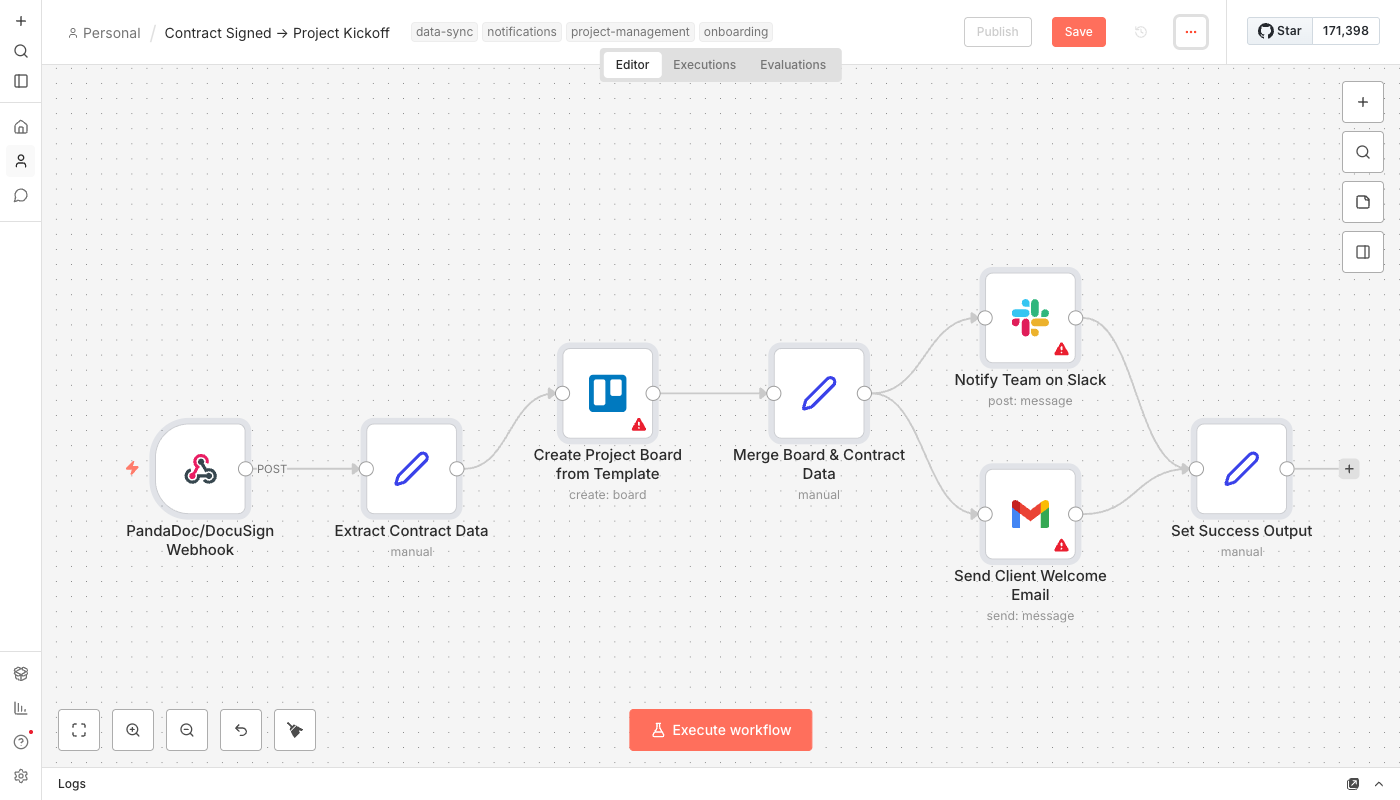
- Listens for contract signatures via webhook from PandaDoc, DocuSign, or similar e-signature tools
- Creates a project board from your template with all your standard tasks, checklists, and due dates
- Names the board automatically using the client name and date (e.g., "Acme Corp - Jan 2026")
- Notifies your team on Slack with client details and a link to the new project board
- Sends the client a welcome email explaining what happens next and when to expect the kickoff call
The whole thing takes about 10 seconds. You don't touch anything.
How It Works
- Client signs the contract in PandaDoc or DocuSign
- E-signature platform sends a webhook to n8n with the signer's name, email, and document details
- n8n extracts the relevant data and normalizes it (different platforms send data differently)
- Trello board is created by copying your template board, renamed with the client's name
- Slack notification fires to your projects channel with all the details
- Welcome email sends to the client with next steps and project timeline
The Slack notification and welcome email happen in parallel - no waiting.
What You'll Need
- n8n instance - Self-hosted (free) or n8n Cloud ($20/month)
- E-signature tool with webhooks - PandaDoc, DocuSign, HelloSign, or similar
- Trello account - Free tier works (or Asana with minor modifications)
- Slack workspace - For team notifications
- Gmail account - For sending client welcome emails
- Template board in Trello - Your standard project setup that gets copied for each new client
The workflow copies your template board, so you need to create that first with all your standard lists and cards.
Creating Your Template Board
Before setting up the automation, create a template board in Trello:
- Create a new board called "[TEMPLATE] Project Kickoff" or similar
- Add your standard lists: To Do, In Progress, Review, Done (or whatever you use)
- Add template cards for recurring tasks: "Kickoff call", "Gather assets from client", "First draft", etc.
- Add checklists to cards that need them
- Set due dates as offsets (e.g., "Kickoff call" due in 3 days, "First draft" due in 2 weeks)
When a contract is signed, n8n copies this entire board - all lists, cards, checklists, and structure - and renames it for the new client.
Note: Due date offsets don't copy automatically in the free Trello API. If you need dynamic due dates, you can add a Code node to calculate and set them based on the project start date.
Setup Instructions
- Create your template board in Trello (see above)
- Import the workflow - Download the JSON and import into n8n
- Set up the webhook - Copy the webhook URL from n8n
- Configure your e-signature platform - In PandaDoc/DocuSign settings, add the webhook URL and select "document completed" or "envelope signed" events
- Connect Trello - Add your Trello API credentials, update the template board ID in the "Create Project Board" node
- Connect Slack - Add credentials and update the channel name/ID
- Connect Gmail - Add your Google account credentials
- Customize the welcome email - Edit the HTML template to match your brand and process
- Test it - Send yourself a test contract and sign it
- Activate - Turn on the workflow
Finding Your Template Board ID
The workflow needs your template board's ID to copy it. Here's how to find it:
- Open your template board in Trello
- Add
.jsonto the end of the URL - Look for the
"id"field at the top of the JSON - Copy that ID into the "Create Project Board from Template" node
Example: If your board URL is https://trello.com/b/ABC123/template-board, go to https://trello.com/b/ABC123/template-board.json and find the ID.
PandaDoc Webhook Setup
To get PandaDoc to notify n8n when a document is signed:
- Go to Settings > Integrations > Webhooks in PandaDoc
- Click Add Endpoint
- Paste your n8n webhook URL
- Select the event: document_state_changed
- In the workflow, we filter for
status === 'document.completed'
For DocuSign, it's similar - go to Admin > Connect and create a new configuration pointing to your n8n webhook URL.
Customization Ideas
Once the basics work:
- Add to Google Calendar - Automatically block time for the kickoff call
- Create a Google Drive folder - Set up the client's project folder with subfolders for assets, deliverables, etc.
- Add client to CRM - Update their status in HubSpot or create a deal
- Different templates for different services - Use a Switch node to pick the right template board based on what they signed up for
- Assign team members - Automatically add specific Trello members to the board based on project type
- Send onboarding questionnaire - Include a link to a Google Form or Typeform in the welcome email
Using Asana Instead of Trello
Prefer Asana? The workflow concept is identical:
- Create a template project in Asana
- Replace the Trello node with an Asana node
- Use "Duplicate Project" operation instead of "Create Board"
- Asana's API handles due date offsets better - tasks keep their relative dates
The rest of the workflow (webhook, Slack, Gmail) stays exactly the same.
The Welcome Email
The default welcome email template includes:
- Personalized greeting with the client's name
- Confirmation that you received their signed contract
- What happens next - kickoff call scheduling, project start date
- Timeline expectations - when they'll hear from you
- Call to action - reply if they have questions
Edit the HTML in the Gmail node to match your brand. The workflow pulls the client's name and start date automatically, so those personalize themselves.
Real Impact
Every new web project used to take 30 minutes of setup. Create the Trello board. Copy the template cards. Rename everything. Message the team. Write the welcome email. Copy the client's details into each message.
Now the contract signature triggers everything. The board appears. The team knows. The client feels taken care of.
But here's what I didn't expect: clients started commenting on how "organized" we seemed. They'd sign the contract, and within minutes they'd have a welcome email with clear next steps. First impressions matter. This automation makes you look like you have your act together - because now you do.
30 minutes saved per project. 10 projects a month. That's 5 hours back. Not counting the mental load of remembering all the steps.