
The Problem
You record every client call. Every team sync. Every project kickoff. The recordings pile up in Google Drive. Good intentions, zero follow-through.
Three weeks later, someone asks "what did we decide about the logo?" and you're scrubbing through a 47-minute video looking for a 30-second conversation. Or worse, nobody remembers, and you make the same decision again.
A marketing agency in SLO told me they had 200+ meeting recordings in their Drive. Total watch time: maybe 3 of them. Hundreds of hours of context, insights, and decisions—completely inaccessible.
The meetings happened. The knowledge died.
What This Does
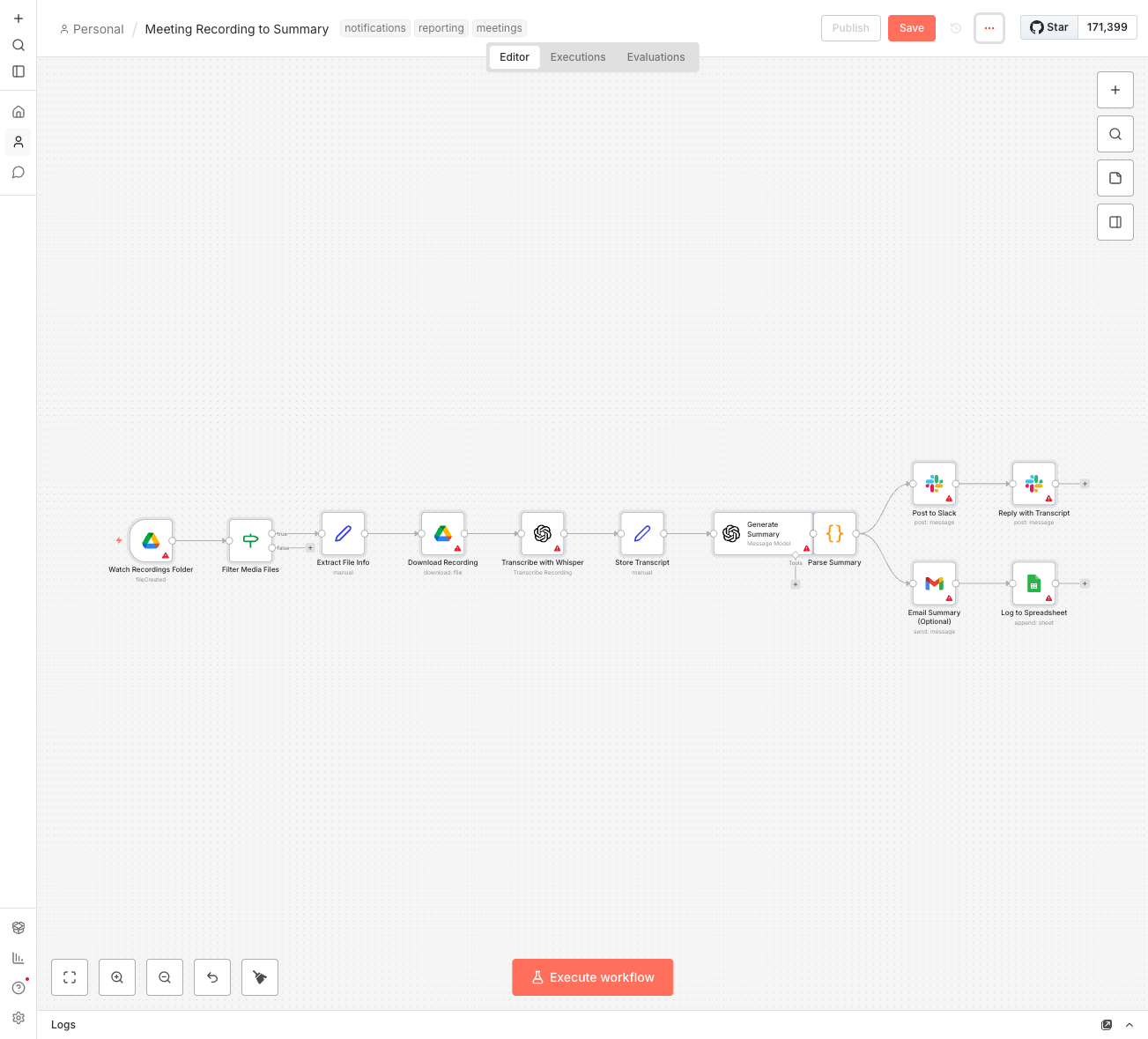
- Watches your recordings folder in Google Drive for new audio or video files
- Transcribes with Whisper—OpenAI's speech-to-text model, highly accurate even with accents and crosstalk
- Generates a structured summary with executive overview, key discussion points, and overall meeting vibe
- Extracts action items with who's responsible and deadlines (when mentioned)
- Lists decisions made so you have a record of what was agreed
- Posts to Slack with the summary and transcript in a thread
- Optionally emails the team for those who prefer inbox over Slack
- Logs everything to a spreadsheet for searchable meeting history
Client calls used to disappear into the void. Now everyone gets a summary within an hour of the call ending—even people who weren't there.
How It Works
Here's the flow:
- Recording lands in folder—you can set Zoom, Google Meet, or any tool to auto-save there
- n8n detects the new file and filters for audio/video formats
- Whisper transcribes the entire recording to text (handles accents, multiple speakers, technical terms)
- GPT-4o-mini analyzes the transcript and extracts: title, summary, key points, decisions, action items, and meeting sentiment
- Summary posts to Slack in your #meeting-summaries channel
- Full transcript replies as thread for reference
- Email goes out (optional) to specified recipients
- Everything logs to Google Sheets for searchable history
A 60-minute meeting becomes a 2-minute read. Action items are clear. Decisions are documented. Nobody asks "what did we say about X?" anymore—they just search the sheet.
The Summary Format
Every meeting summary includes:
- Meeting title—AI infers from context if not stated
- Duration estimate—rough length based on transcript
- Attendees—names extracted when mentioned
- Sentiment—productive, challenging, routine, or urgent
- Executive summary—2-3 paragraph overview
- Key discussion points—bullet list of main topics
- Decisions made—what was agreed during the meeting
- Action items—task, owner, and deadline in a table
- Follow-up notes—next meeting or pending items
The AI is trained to be thorough but concise. It won't give you a transcript rehash—it gives you what you need to know without reading 50 pages.
What You'll Need
- n8n instance—Self-hosted (free) or n8n Cloud ($20/month)
- Google Drive—A folder for meeting recordings
- OpenAI API key—For both Whisper (transcription) and GPT (summarization)
- Slack workspace—Create a #meeting-summaries channel
- Gmail (optional)—If you want email summaries too
- Google Sheets—For logging and searchable history
Cost estimate: Whisper costs about $0.006/minute of audio. GPT-4o-mini costs roughly $0.001 per summary. A 60-minute meeting costs about $0.40 to process. Do 50 meetings/month for ~$20 in API costs.
Your Spreadsheet Setup
Create a new Google Sheet called "Meeting Log" with these columns:
- Date—When the meeting was processed
- Title—AI-generated meeting title
- Duration—Estimated length
- Attendees—Who was there
- Summary—Executive overview
- Key Points—Bullet list of discussion items
- Decisions—What was agreed
- Action Items—Task/owner/deadline
- Sentiment—Meeting vibe
- Recording Link—Link back to original in Drive
Now you have a searchable database of every meeting. "What did we decide about pricing?" Ctrl+F → found in March 12th client call.
Setup Instructions
- Create your recordings folder in Google Drive (e.g., "Meeting Recordings")
- Configure your recording tool to save to this folder (Zoom, Meet, Loom all have auto-upload options)
- Create the Slack channel #meeting-summaries
- Create the spreadsheet with columns listed above
- Import the workflow—Download the JSON and import into n8n
- Connect Google Drive—Add credentials, update the folder ID to your recordings folder
- Connect OpenAI—Add your API key (used for both Whisper and GPT)
- Connect Slack—Add credentials, update channel name if different
- Connect Gmail (optional)—Add credentials if you want email summaries
- Connect Google Sheets—Link your Meeting Log spreadsheet
- Test with a short recording—Drop a 2-3 minute test audio in the folder
- Activate—Turn on the workflow and start capturing meeting knowledge
Tips for Better Results
Whisper is remarkably good, but you can help it:
- Use decent audio quality—Built-in laptop mics are fine, but external mics are better
- Minimize background noise—Coffee shop recordings are harder to transcribe
- One speaker at a time—Cross-talk confuses any transcription AI
- Say names explicitly—"Good point, Sarah" helps the AI know who said what
- State action items clearly—"So the action item is: John will send the report by Friday"
The AI will do its best regardless, but clear audio and explicit statements give you better summaries.
Customization Ideas
Once the basics work:
- Different channels for different meeting types—Client calls to #client-calls, internal syncs to #team-syncs
- Action item routing—If someone's assigned a task, DM them directly
- Weekly digest—Summarize all meetings from the week into one Monday email
- Client portal integration—Auto-share relevant meeting summaries with clients
- CRM logging—Push client meeting summaries to their HubSpot/Salesforce record
- Project management—Create tasks in Asana/Trello from extracted action items
- Searchable archive—Use a tool like Notion for richer meeting notes storage
A Simpler Alternative
If you just want transcripts without the full summary workflow:
- Upload recordings manually to Whisper.ai or use OpenAI's web interface
- Copy transcript into ChatGPT and ask for a summary
- Paste summary into Slack yourself
Takes about 5-10 minutes per meeting instead of automatic. Good for low volume or testing whether this is valuable before automating.
Real Impact
A web agency I work with records every client meeting. Before this automation, those recordings sat in Drive collecting dust. 90% never got watched. Decisions got forgotten. Same questions came up meeting after meeting.
Now every project channel gets a summary within an hour. The project manager doesn't have to take notes during calls—she can actually listen and engage. New team members can get context on a client by reading 5 summaries instead of watching 10 hours of video.
The best part? Six months of meeting knowledge became searchable. "What did they say about the rebrand budget?" Used to be a 30-minute video hunt. Now it's a Ctrl+F in a spreadsheet.
Meetings still happen. But the knowledge doesn't die anymore.