
The Problem
You sign a new client. Great! Now you need to:
- Send them a welcome email
- Include a link to your intake form
- Include a link to book their first session
- Remember to follow up if they don't book
Every. Single. Time.
One speech therapist I work with was spending an hour per new client just on welcome emails. Not because the emails were complicated. Just because she had to remember to do it, find the right links, personalize the message, and then track who hadn't booked yet.
Now she adds them to a spreadsheet and forgets about it. The automation handles the rest.
What This Does
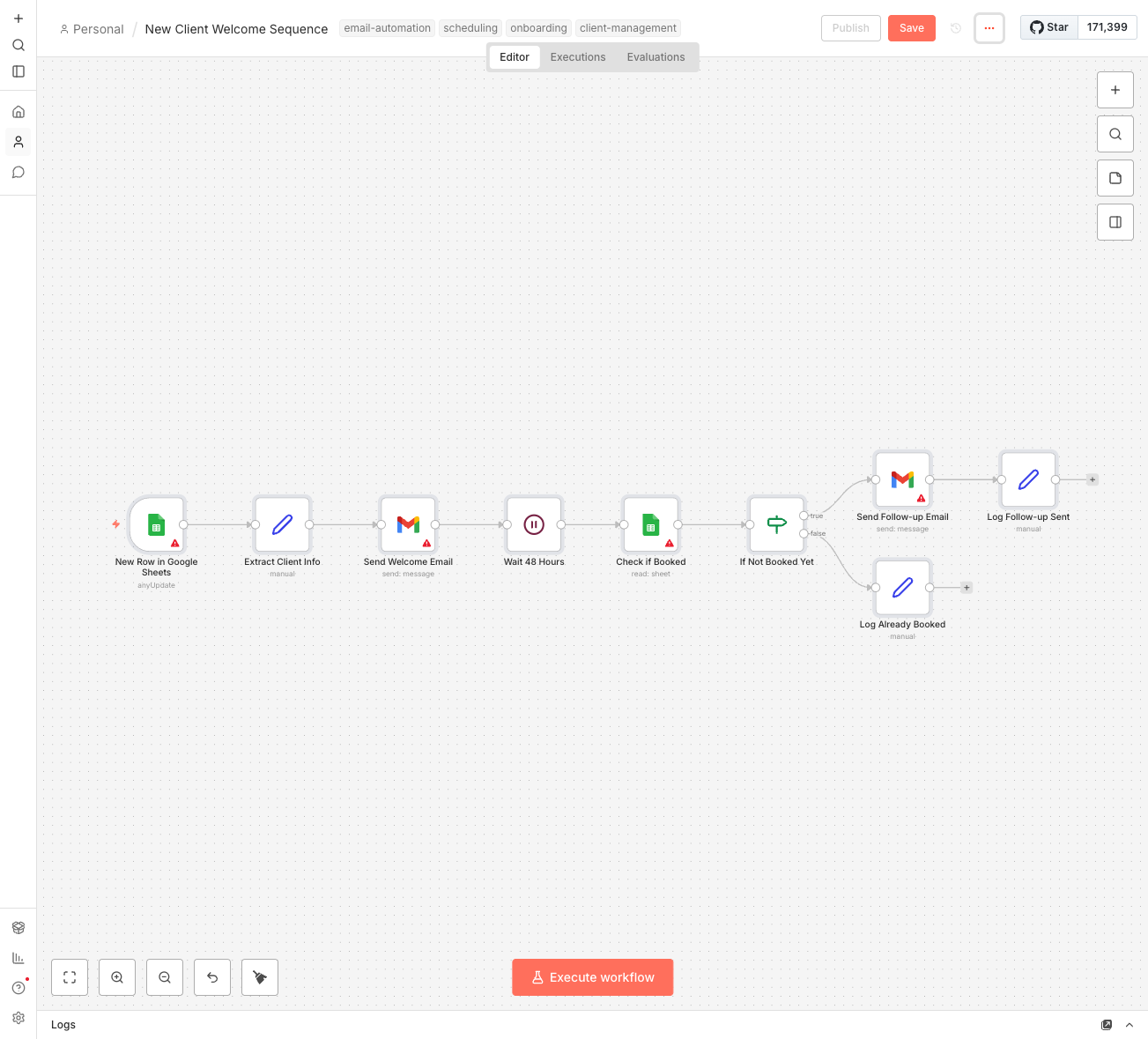
- Triggers instantly when you add a new client to your "New Clients" spreadsheet
- Sends a personalized welcome email with their name and the service they signed up for
- Includes your intake form link so they can fill out important info before your first session
- Includes your booking link (Calendly, Google Calendar, or whatever you use)
- Waits 48 hours and checks if they've booked yet
- Sends a friendly follow-up if they haven't scheduled their session
You can be on vacation and new clients still feel taken care of.
How It Works
The workflow has two main phases:
Phase 1: Instant Welcome
- You add a row to your "New Clients" spreadsheet with name, email, and service
- n8n detects the new row within a minute
- Welcome email goes out with personalized greeting, intake form link, and booking link
Phase 2: Smart Follow-up
- Workflow waits 48 hours (you can change this)
- Checks your spreadsheet to see if they've booked (you mark a "Booked" column when they do)
- If not booked: Sends a gentle reminder email
- If already booked: Does nothing (no annoying duplicate emails)
Total time from new client to welcome email: under 60 seconds.
What You'll Need
To get this running:
- n8n instance - Self-hosted (free) or n8n Cloud ($20/month)
- Google Sheets - Your "New Clients" tracking spreadsheet
- Gmail account - For sending the welcome and follow-up emails
- Intake form - Google Forms, Typeform, or any form with a shareable link
- Booking system - Calendly, Google Calendar Appointment Scheduling, or any booking link
You probably already have most of these. The setup is connecting them together.
Setup Instructions
Step 1: Prepare Your Spreadsheet
Create a Google Sheet with these columns:
- Name - Client's full name
- Email - Their email address
- Phone - Optional, for your records
- Service - What they signed up for
- Booked - Leave empty initially, mark "Yes" when they book
Step 2: Import the Workflow
- Download the JSON file below
- In n8n, go to Workflows > Import from File
- Select the downloaded file
Step 3: Configure Your Connections
- Google Sheets trigger - Connect your Google account, select your spreadsheet and "New Clients" sheet
- Gmail nodes - Connect your Gmail account (same Google account works)
- Update the placeholder URLs - Find "YOUR_GOOGLE_FORM_URL" and "YOUR_CALENDLY_OR_CALENDAR_BOOKING_URL" in the "Extract Client Info" node and replace with your actual links
Step 4: Customize the Emails
Edit the email text in the "Send Welcome Email" and "Send Follow-up Email" nodes. Add your name, adjust the tone, and include any other info new clients need.
Step 5: Test It
- Add a test row to your spreadsheet with your own email
- Watch the workflow execute in n8n
- Check that you received the welcome email
- Mark the "Booked" column and verify no follow-up is sent (or leave it blank to test the follow-up after 48 hours)
Step 6: Activate
Turn on the workflow. You're live.
Customization Ideas
Once the basics are working, consider these upgrades:
- Multiple follow-ups - Add a second follow-up at 5 days, then a final "still interested?" at 7 days
- Different sequences by service - Use an IF node to send different welcome emails based on which service they signed up for
- Slack notification - Add a Slack alert when a new client is added so you know immediately
- Calendar check - Instead of a "Booked" column, check your actual Google Calendar for appointments with that email
- Onboarding checklist - Send a second email after they book with a list of what to bring/prepare
- No-show detection - Check if they actually showed up and send a rescheduling email if they didn't
About the 48-Hour Timing
Why 48 hours? It's the sweet spot.
- Too soon (24 hours) - Feels pushy. People have lives.
- Too late (a week) - They've forgotten about you. The excitement is gone.
- 48 hours - Enough time to handle life stuff, soon enough that you're still top of mind.
You can adjust this in the "Wait 48 Hours" node. Some coaches prefer 72 hours. Some high-touch services do 24 hours. Test what works for your clients.
Real Impact
That speech therapist? Before the automation:
- 1 hour per new client on welcome emails
- Forgot to follow up about 40% of the time
- Lost clients who "meant to book but forgot"
After:
- 30 seconds to add them to the spreadsheet
- 100% follow-up rate
- Booking rate went from 70% to 90%
She told me: "I used to dread new client paperwork. Now I just type their name and email, and everything happens. My clients think I'm incredibly organized. I'm just lazy in the right way."
That's the goal. Look professional. Work less.