
The Problem
You start every morning the same way: inbox full of customer emails. Billing questions mixed with technical issues mixed with spam mixed with actual sales opportunities.
You read each one. You decide who should handle it. You write a response from scratch. Or worse, you copy-paste from a template and hope you remember to personalize it.
By 11am, you've answered 15 emails and haven't done any actual work yet. Sound familiar?
A bookkeeper in Atascadero told me support emails were eating her entire morning. She'd spend 2-3 hours just triaging and responding before she could touch any actual accounting work. Now she spends 20 minutes reviewing AI drafts.
What This Does
- Watches your support inbox for new emails (support@, help@, info@)
- AI reads each email and categorizes it: billing, technical, sales, complaint, or spam
- Rates urgency 1-5 so you know what needs immediate attention
- Drafts a professional response that acknowledges the issue and provides next steps
- Logs everything to a spreadsheet so you have a support ticket system for free
- Routes to the right person via Slack based on category (billing issues go to accounts, complaints go to a manager)
You review the drafts, make any tweaks, and hit send. Or if the AI nailed it, just send as-is.
How It Works
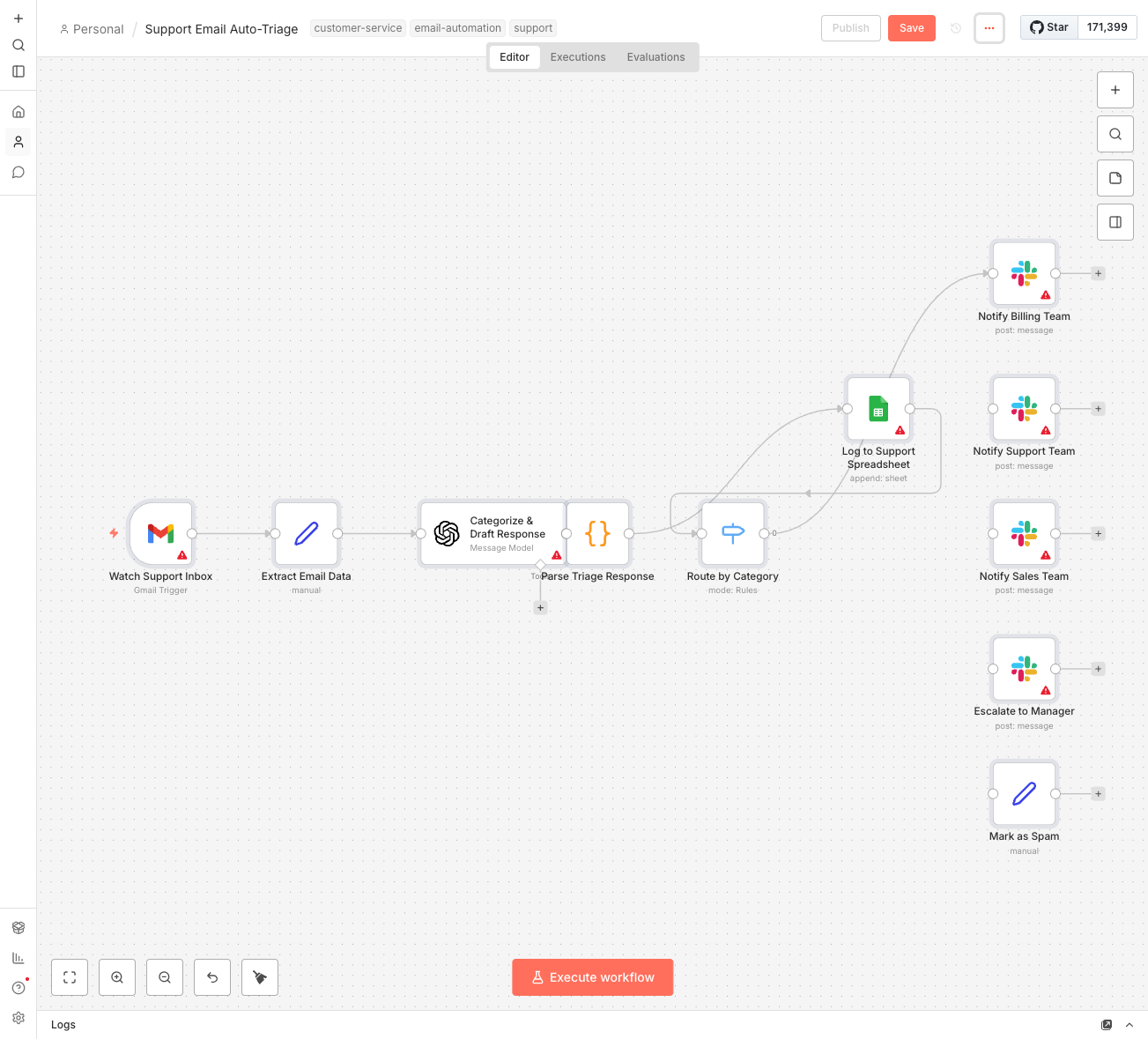
Here's the flow:
- Email arrives at your support address
- n8n grabs it and sends the subject + body to OpenAI
- AI analyzes and returns: category, urgency (1-5), one-sentence summary, and a draft response
- Everything logs to your Google Sheet with status "New"
- Based on category, the right Slack channel gets notified
The AI is trained to write responses that sound human, not robotic. It acknowledges the customer's issue, provides helpful information, and includes a clear next step.
The Categories
The AI sorts emails into five buckets:
- Billing - Payment issues, invoices, refunds, pricing questions → Routes to #support-billing
- Technical - Bugs, errors, how-to questions, feature requests → Routes to #support-technical
- Sales - New customer inquiries, quotes, pricing for new services → Routes to #support-sales
- Complaint - Unhappy customers, negative feedback, escalation needed → Routes to #support-escalations
- Spam - Promotional junk, unrelated messages → Auto-archived, no notification
You can customize these categories and routing channels to match your team structure.
What You'll Need
- n8n instance - Self-hosted (free) or n8n Cloud ($20/month)
- Gmail account - Your support inbox ([email protected])
- OpenAI API key - Costs about $0.002-0.01 per email (GPT-4o-mini)
- Google Sheets - For logging and tracking support tickets
- Slack workspace - For routing notifications to your team
Processing 50 emails per day would cost roughly $5-15/month in OpenAI API calls. Way cheaper than missing a sales opportunity or letting a complaint fester.
Your Spreadsheet Setup
Create a new Google Sheet called "Support Log" with these columns:
- Date - When the email was triaged
- From - Customer email address
- Subject - Email subject line
- Category - billing, technical, sales, complaint, spam
- Urgency - 1-5 rating
- Summary - AI-generated one-liner
- Owner - Who should handle it
- Status - New, In Progress, Resolved
- Draft Response - AI-written response ready to send
- Message ID - For reference back to the original email
This becomes your free support ticket system. Filter by status, sort by urgency, track response times.
Setup Instructions
- Import the workflow - Download the JSON file and import into n8n
- Connect Gmail - Add your Google account credentials, update the filter to match your support address
- Connect OpenAI - Add your API key
- Create the spreadsheet - Make a new Google Sheet with the columns above
- Connect Google Sheets - Link your new spreadsheet, select the "Support Log" sheet
- Create Slack channels - #support-billing, #support-technical, #support-sales, #support-escalations
- Connect Slack - Add your Slack credentials, update channel names if you used different ones
- Test with a real email - Send yourself a test support request and watch it flow through
- Activate - Turn on the workflow and start triaging automatically
Customization Ideas
Once the basics work:
- Add more categories - Returns, partnerships, press inquiries
- Auto-respond to spam - Instead of just archiving, send a "we got your message" auto-reply
- Escalation rules - If urgency is 5, also send an SMS to the manager
- VIP detection - Check if the sender is a known high-value customer and always escalate
- Response templates - Give the AI examples of your best past responses to learn your voice
- SLA tracking - Add a "Deadline" column based on urgency level
- Auto-labeling - Have n8n apply Gmail labels to emails after processing
The Draft Responses
The AI writes responses that:
- Acknowledge the issue - Shows you actually read what they wrote
- Show empathy - "I understand how frustrating this must be"
- Provide next steps - Actionable information, not just "we'll look into it"
- Include a clear CTA - What should the customer do next?
The drafts land in your spreadsheet. Open it, tweak if needed, copy, paste into Gmail, send. Or if it's perfect, just send.
Most drafts need minimal editing. The AI learned to write like a helpful human, not a corporate robot.
Real Impact
Support emails used to eat my entire morning. I'd sit down at 8am, start reading, and suddenly it's 11am and I haven't done any real work.
Now I spend 20 minutes reviewing AI drafts instead of 2 hours writing from scratch. The categorization means I can batch similar issues. The urgency rating means I know what to tackle first.
The best part? Nothing slips through the cracks anymore. Every email gets logged, categorized, and routed. Complaints get escalated before they turn into angry reviews. Sales inquiries get answered same-day.
It's not about replacing human judgment. It's about not wasting human brainpower on reading "where's my invoice" for the 47th time.