


So here's a problem I see all the time with contractors and tradespeople on the Central Coast: they've got binders full of manuals, permit requirements, building codes, and product specifications. And when a question comes up on a job site, they either have to dig through a three-inch stack of paper or call someone and wait.
Last month I showed a general contractor in San Luis Obispo a tool called NotebookLM. I loaded every permit document for his typical residential projects. Now when he needs to know "what's the setback requirement for Zone X?" he types the question and gets an answer in seconds. With citations pointing to the exact page.
It's like having a research assistant who actually read all your documents.
What NotebookLM Actually Is
NotebookLM is Google's free AI research tool. You upload your own documents, PDFs, websites, YouTube videos, audio files, Google Docs, Google Slides, and it becomes an expert on your specific stuff.
This is different from ChatGPT or regular Gemini. Those tools answer based on their training data, which is basically "the internet." NotebookLM only answers based on what you've uploaded. It's not hallucinating facts from some random website. It's pulling directly from your documents.
And here's the part that matters: it shows you exactly where each answer came from. Click a citation and you see the exact quote from the exact source. No more "I think the AI is making this up."

The Numbers (So You Know What You're Getting)
Here's what the free version gives you:
- 50 sources per notebook (think: 50 PDFs, or 50 web links, or a mix)
- 500,000 words per source (that's about 1,000 pages of text)
- 200MB file size limit per upload
- 50 questions per day
For most small businesses, that's plenty. You're not uploading the entire Library of Congress. You're uploading the 20-40 documents you actually reference on a regular basis.
Real Use Cases (Not Hypotheticals)
Here's what I've seen people actually do with this:
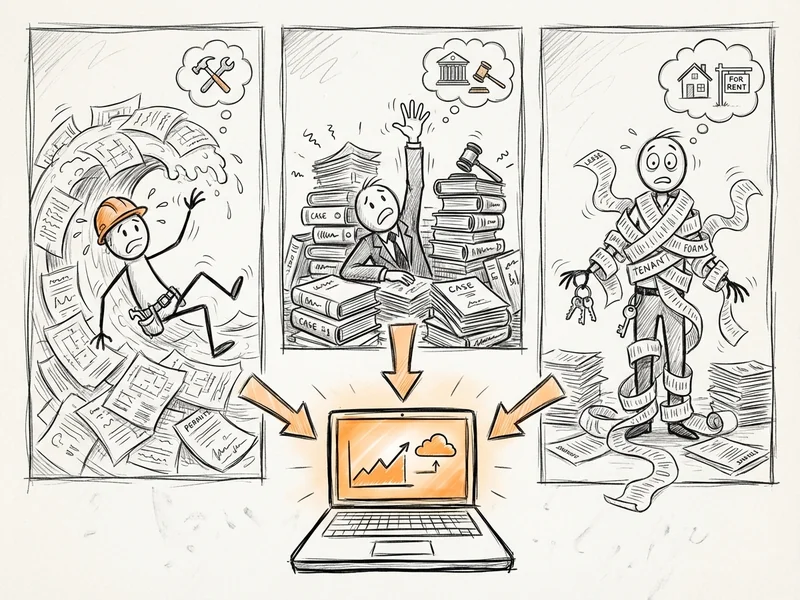
Contractors and Building Codes
Upload your local building codes, product installation manuals, and permit requirements. Ask questions like "What's the minimum ceiling height for a habitable room?" or "What are the ventilation requirements for a bathroom remodel?"
The contractor I mentioned earlier used to call the county building department twice a week with questions. Now he checks NotebookLM first and only calls when it's something genuinely ambiguous.
Small Law Offices
Upload case files, contracts, and relevant statutes for a specific matter. Ask "What are the key dates in this contract?" or "What precedent cases involve similar circumstances?"
One paralegal told me it cut her document review time in half.
Property Managers
Upload your HOA rules, lease agreements, and maintenance contracts. When a tenant asks "Can I install a satellite dish?" you can find the answer in 10 seconds instead of digging through a filing cabinet.
The Audio Overview Feature (Bonus)
In September 2024, Google added Audio Overview. It's weird and kind of delightful.
Click a button and NotebookLM generates a podcast-style conversation between two AI hosts discussing your documents. They summarize the key points, make connections you might have missed, and banter back and forth like they're actual podcast hosts.
Is it useful? Honestly, sometimes. If you've got a dense technical document and you want a high-level overview while you're driving, it works. It's also a good way to spot-check whether NotebookLM actually understood your material.
Is it a little uncanny? Also yes. The voices are surprisingly natural, which makes it weirder when they say something slightly off.
What NotebookLM Won't Do
Let me be clear about the limits:
- It only knows what you upload. If the answer isn't in your documents, it can't help you. It won't fill in gaps with internet knowledge.
- It's not always right. AI still makes mistakes, especially with complex technical documents or when sources contradict each other. Always verify important answers.
- It can't take actions. It's a research tool, not an automation tool. It reads and answers, that's it.
- Sensitive data considerations. Google says your data isn't used to train NotebookLM, but if you're dealing with truly confidential documents (medical records, trade secrets), think carefully before uploading.
How to Get Started (5 Minutes)
This is genuinely simple:
- Go to notebooklm.google
- Sign in with your Google account
- Click "New Notebook"
- Upload some sources (drag and drop works)
- Start asking questions in the chat box
Start with something small. Upload three or four documents you actually reference regularly. Ask it a few questions you know the answers to, so you can see how well it handles your material.
If it works for those, add more documents. Build up over time.

The Bottom Line
NotebookLM solves a specific problem: you've got a pile of documents, and you need to find information in them quickly without reading everything every time.
It's free. It's surprisingly good. And it's the kind of AI tool that actually saves time instead of creating new problems.
If you've got a stack of PDFs that you wish someone would just read for you, this is about as close as it gets.
What YouGrow Does Differently
NotebookLM is great for research and document Q&A. But it doesn't build you a website, and it doesn't integrate with your business workflows.
I help small businesses figure out which AI tools actually make sense for their specific situation, then help implement them in ways that save real time. Sometimes that's NotebookLM for document research. Sometimes it's Zapier for workflow automation. Sometimes it's a custom solution.
If you're curious which AI tools might help your business, let's chat. No charge for the conversation.