
The Problem
You know you should ask for reviews. Every business owner knows it. Google reviews are basically free marketing.
But you're busy. You finish a job, pack up your tools, and drive to the next one. Asking for a review is the last thing on your mind.
So you don't. And your Google listing stays at 12 reviews while the guy across town has 147.
Here's the thing: most happy customers would leave a review if you just asked them. The timing and the ask just need to happen automatically.
What This Does
- Watches your job spreadsheet for status changes to "Complete"
- Waits 2 days so you don't seem like you're pouncing on them
- Sends a personalized email with their name and service type
- Includes a direct Google review link so they can click and leave a review in 30 seconds
- Marks the spreadsheet so you know who's been asked
You mark jobs complete. The reviews take care of themselves.
How It Works
The flow is straightforward:
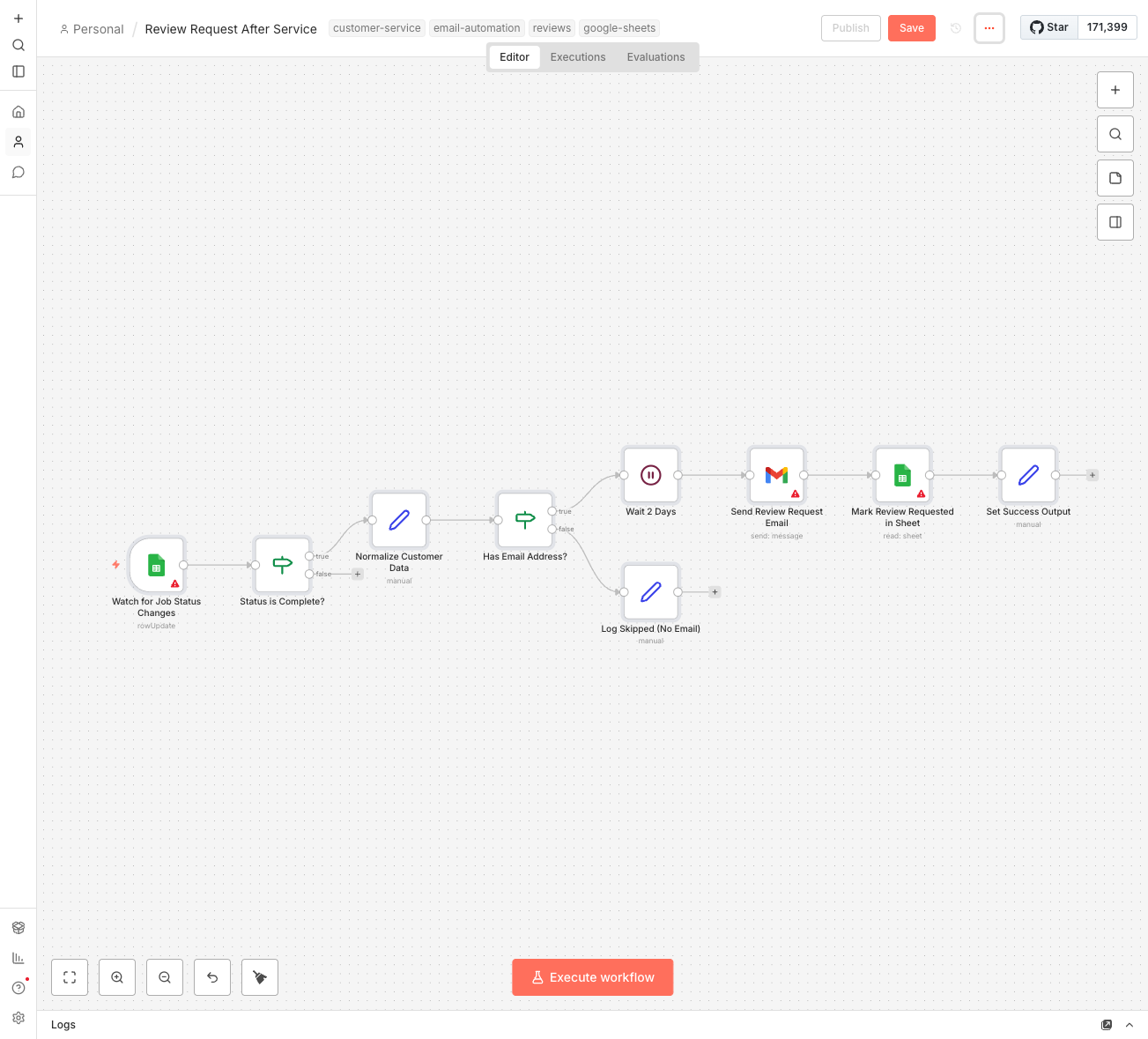
- You complete a job and update the "Status" column to "Complete" in your spreadsheet
- n8n notices the change and grabs the customer's info
- Workflow waits 2 days (configurable—some people like 3-5 days)
- Customer receives a friendly email thanking them and asking for a review
- Spreadsheet gets updated with the date the request was sent
The email is personal but not pushy. It thanks them for their business, includes a one-click link to your Google review page, and invites them to reply directly if something wasn't right.
What You'll Need
To get this running:
- n8n instance - Self-hosted (free) or n8n Cloud ($20/month)
- Google Sheets - Where you track your jobs with customer name, email, and status
- Gmail account - For sending the review request emails
- Your Google review link - The direct URL customers can click to leave a review
Don't have your Google review link? Search "[Your Business Name]" on Google, click "Write a review" on your business listing, and copy that URL.
Your Spreadsheet Setup
Your job tracking spreadsheet needs these columns (column names can vary, the workflow handles common variations):
- Customer Name - Who you did the work for
- Customer Email - Where to send the review request
- Service Type - What you did ("kitchen remodel", "deep clean", etc.)
- Status - Change this to "Complete" when done
- Review Requested - Workflow fills this in automatically
Already have a spreadsheet? Just add a "Review Requested" column and make sure you have customer emails. That's it.
Setup Instructions
- Import the workflow - Download the JSON file and import it into your n8n instance
- Connect Google Sheets - Add your Google account credentials and select your job tracking spreadsheet
- Connect Gmail - Add your Gmail account (the "from" address for review requests)
- Add your Google review link - Find the line "YOUR_GOOGLE_REVIEW_LINK" in the email node and replace it
- Customize the email - Optional: tweak the wording to match your voice
- Test it - Add a test row with your own email, mark it complete, and manually trigger
- Activate - Turn on the workflow and let it run
The 2-day wait means you won't see results immediately when testing. For testing, temporarily change it to 2 minutes, verify the email arrives, then change it back.
Customization Ideas
Once the basics are working:
- Adjust the timing - Some businesses prefer 3-5 days, especially for bigger projects where customers need time to enjoy the results
- Add a second reminder - If no review after 7 days, send a gentler follow-up
- Filter by service type - Only request reviews for certain services
- Skip repeat customers - Check if they've already reviewed you before
- Include a photo - For visual services (remodeling, landscaping), attach a photo of the completed work
The Email Template
The workflow includes a proven email template, but here's what makes it work:
- Opens with their name - "Hi Sarah" not "Dear Customer"
- References their specific service - "your kitchen remodel" not "our recent service"
- Big obvious button - One click to leave a review
- Low pressure - "if you could take a minute" not "please leave a 5-star review"
- Escape hatch - "If anything wasn't right, just reply to this email"
That last part is important. Unhappy customers who might leave a 2-star review will often just reply to you instead. You can fix their problem privately.
The Real Impact
A contractor in Atascadero started using this workflow last spring. His situation:
- Before: 12 Google reviews, 4.2 stars
- After 3 months: 47 Google reviews, 4.8 stars
All he did was mark jobs complete in his spreadsheet, which he was already doing.
His words: "I didn't change anything about how I run jobs. I just stopped forgetting to ask for reviews. Now they ask for me."
More reviews = more visibility. More visibility = more calls. More calls = more jobs. The math is simple.