
The Problem
You track everything. Revenue in one tab. Leads in another. Jobs completed somewhere else.
But when's the last time you actually looked at those numbers? Like, sat down and compared this week to last week?
Probably not recently. You're busy running the business.
One client told me she had 18 months of data in a spreadsheet she'd never once reviewed. "I kept meaning to," she said. "But who has time to dig through spreadsheets every Monday?"
Now she gets a summary in her inbox with her morning coffee. Revenue, leads, jobs completed. Week-over-week comparison. Takes her 30 seconds to scan instead of 30 minutes to compile.
What This Does
- Runs automatically every Monday at 8am (or whatever day/time you prefer)
- Pulls your metrics from Google Sheets where you're already tracking things
- Calculates this week vs. last week so you see the trend, not just the numbers
- Sends a clean, formatted email straight to your inbox
- Color-coded changes so up is green and down is red at a glance
No spreadsheet spelunking required. Just open your email and know where you stand.
How It Works
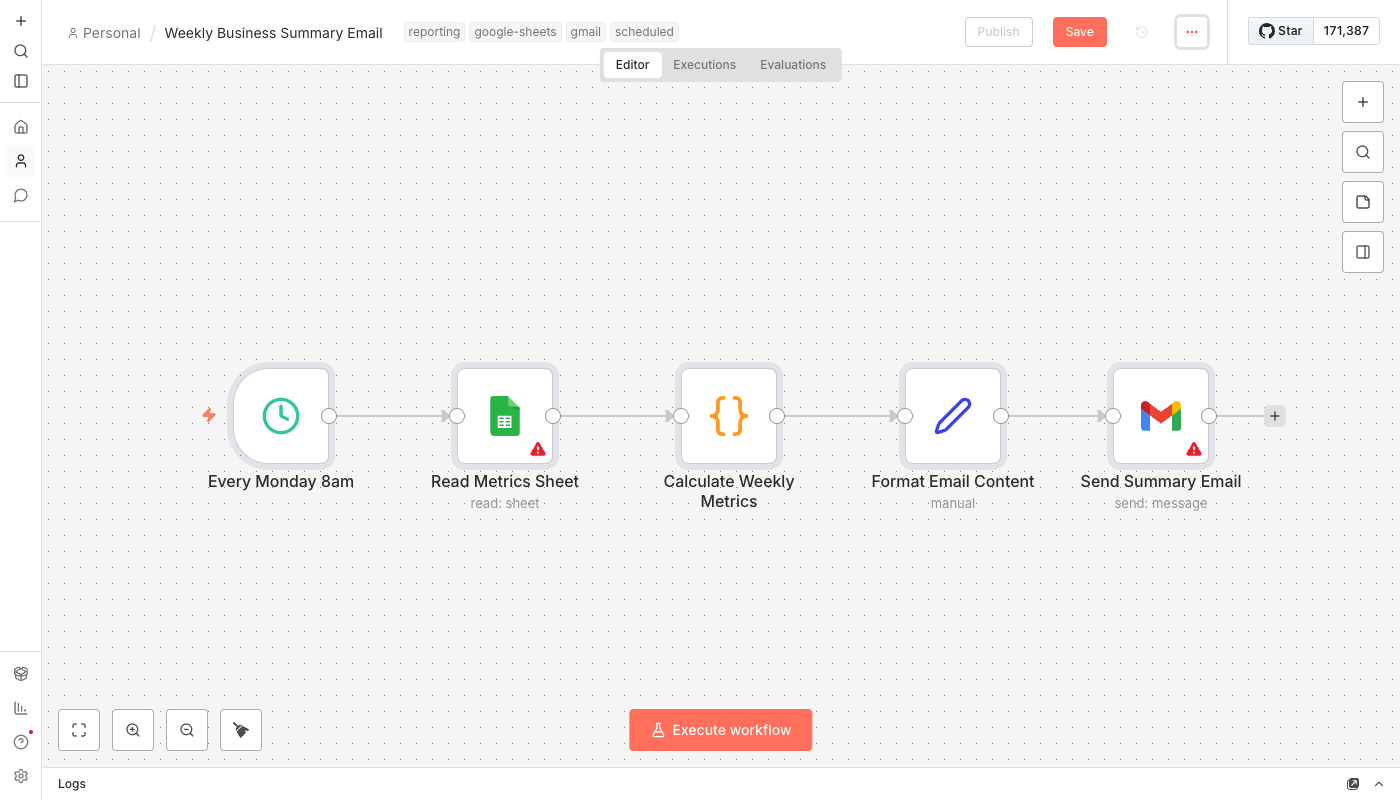
Simple flow:
- Schedule trigger fires every Monday at 8am (configurable)
- Workflow reads your Google Sheet that has your daily/weekly metrics
- Code node calculates totals for this week and last week
- Formats a clean HTML email with a comparison table
- Gmail sends it to you before you've finished your coffee
Expected sheet format: Date column, plus columns for Revenue, Leads, Jobs Completed (or whatever you track). The workflow handles common column name variations.
What You'll Need
Pretty minimal:
- n8n instance - Self-hosted (free) or n8n Cloud ($20/month)
- Google Sheets - Where you're already tracking metrics (or will start)
- Gmail account - For sending the summary email
If you don't have a metrics spreadsheet yet, this is a good excuse to start one. Doesn't need to be fancy. Date, revenue, leads, jobs completed. That's it.
Setup Instructions
- Create your metrics spreadsheet (if you don't have one)
- Column A: Date (YYYY-MM-DD format works best)
- Column B: Revenue
- Column C: Leads
- Column D: Jobs Completed
- Add a row for each day or each time you update it
- Import the workflow into your n8n instance
- Update the Google Sheets node
- Connect your Google account
- Select your spreadsheet and sheet name
- Update the Gmail node
- Connect your Gmail account
- Change the recipient email to yours
- Adjust the schedule if you want it on a different day/time
- Test it - Click "Execute Workflow" to run it now and check your email
- Activate - Turn it on and forget about it
Most common issue: column names don't match what the workflow expects. Check the Code node and adjust the field names if needed.
Customization Ideas
Once you've got basics working:
- Add more metrics - Website visitors, email signups, support tickets, whatever matters to your business
- Send to Slack instead - Or in addition. Replace the Gmail node with Slack.
- Monthly summary - Add a second workflow that runs on the 1st for monthly totals
- Multiple recipients - Send to your business partner or accountant too
- Threshold alerts - Add a condition to highlight if revenue dropped more than 20%
What If I Don't Track Anything Yet?
Start now. Seriously. Takes 5 minutes.
Create a Google Sheet with these columns:
- Date - Today's date
- Revenue - What you made today (or this week)
- Leads - New inquiries, form submissions, calls
- Jobs Completed - Projects finished, services delivered
Update it when you remember. Even once a week is fine. Even rough numbers are better than nothing.
In a month, you'll have data. In 3 months, you'll see trends. In a year, you'll wonder how you ever ran a business without it.
This workflow just makes you actually look at what you're tracking.
Real Impact
That client who never looked at her spreadsheets? Three weeks after setting this up, she noticed her lead count had dropped 40% from the month before.
Turned out her website contact form had broken during a WordPress update. She had no idea. It had been broken for 2 weeks.
"If I hadn't been getting that Monday email, I probably wouldn't have noticed for another month," she said.
The fix took 10 minutes. The leads she would have lost? Probably thousands of dollars.
Sometimes the value isn't in what the automation does. It's in what it helps you notice.